Showing posts sorted by date for query medication reminder. Sort by relevance Show all posts

Thursday, October 15, 2026

The Ultimate Holiday Gift Guide for Aging Parents in 2026

The Ultimate Holiday Gift Guide for Aging Parents in 2026

Adult children giving practical technology gifts to aging parents during the holiday season

"The best holiday gifts are not the ones that collect dust. They are the ones that make everyday life easier, safer, healthier, and happier." — Dennis Thomas, Senior Tech Simplified

Shopping for aging parents can be difficult. Most parents insist they do not need anything. Yet many families still want to find a meaningful gift that improves the quality of life. Technology offers some of the most practical gifts available because the right device can provide safety, convenience, communication, and peace of mind throughout the year.

📝 Quick Summary

This holiday gift guide highlights practical technology gifts that seniors actually use and appreciate.

  • Gift ideas for parents and grandparents.
  • Technology that improves daily life.
  • Safety-focused recommendations.
  • Easy-to-use devices.

🎄 Why Practical Gifts Win

Many seniors already have plenty of clothes, decorations, and household items.

The most appreciated gifts often help with:

  • Communication
  • Safety
  • Health
  • Entertainment
  • Independence

🎁 Gift Idea #1: Amazon Echo Show

One of the most useful devices available for seniors.

  • Video calling
  • Medication reminders
  • Weather updates
  • Voice assistance

Check Price on Amazon

🎁 Gift Idea #2: Digital Photo Frames

Allow family members to send photos instantly from anywhere.

Grandparents love seeing updated pictures of children and grandchildren.

Check Price on Amazon

🎁 Gift Idea #3: Smartwatches With Fall Detection

Perfect for seniors who live alone.

  • Fall detection
  • Emergency calling
  • Health monitoring
  • Medication reminders

Check Price on Amazon

🎁 Gift Idea #4: Smart Blood Pressure Monitors

Health monitoring remains one of the most practical gifts available.

Check Price on Amazon

🎁 Gift Idea #5: Medication Reminder Systems

Help seniors stay organized and avoid missed medications.

Check Price on Amazon

🎁 Gift Idea #6: Easy-to-Use Tablets

Perfect for video calls, games, books, photos, and entertainment.

Check Price on Amazon

🧠 Gifts That Keep Giving

The best gifts continue providing value long after the holidays end.

Technology that improves communication, safety, and health can make a meaningful difference every day.

❓ Frequently Asked Questions

What is the best technology gift for seniors?

Digital photo frames and Echo Show devices remain two of the most popular choices.

What if my parent dislikes technology?

Choose products that solve a problem rather than focusing on technical features.

What gift helps seniors stay independent?

Smartwatches, medication reminder systems, and smart home devices can all help.

What is the easiest technology gift to use?

Digital photo frames often require the least amount of learning.

🔗 More From Senior Tech Simplified

Related Article:
10 Technology Gifts Seniors Actually Want for Christmas 2026

Related Article:
Digital Photo Frames for Grandparents: The Gift That Keeps Giving

Related Article:
The Best Smartwatches for Seniors Who Live Alone in 2026

💬 Join the Conversation

Which gift would your parents appreciate most this holiday season?

Final Thoughts

Thoughtful gifts are not measured by price. They are measured by how much they improve someone's life. Technology gifts that provide safety, connection, and independence often become the most appreciated gifts under the tree.

Best Holiday Gifts for Seniors Who Value Independence

The right technology gift can help aging parents stay safer, healthier, and more connected throughout the year.

Thursday, October 8, 2026

10 Technology Gifts Seniors Actually Want for Christmas 2026

10 Technology Gifts Seniors Actually Want for Christmas 2026

Diverse group of seniors opening technology gifts around a decorated Christmas tree

"The best gifts are not the most expensive gifts. They are the gifts that make everyday life easier, safer, and more enjoyable." — Dennis Thomas, Senior Tech Simplified

Every holiday season, millions of families struggle with the same question: What do you buy for a parent or grandparent who already has everything? The answer is often technology. Not flashy gadgets or complicated electronics. Useful technology that helps seniors stay connected, safe, healthy, and independent. These are the technology gifts seniors actually appreciate receiving.

📝 Quick Summary

These technology gifts solve real problems while helping seniors stay connected to family and enjoy greater independence.

  • Great gift ideas for parents and grandparents.
  • Easy-to-use technology.
  • Practical and meaningful gifts.
  • Strong value for everyday use.

🎄 Why Technology Makes a Great Gift

The best technology gifts focus on solving everyday challenges.

Good technology should:

  • Save time
  • Increase safety
  • Improve communication
  • Reduce stress
  • Support independence

When technology accomplishes these goals, seniors quickly see its value.

📘 Amazon Product Recommendations

🎁 1. Digital Photo Frames

Family photos remain one of the most appreciated gifts.

Modern digital photo frames automatically receive new pictures from children and grandchildren.

🎁 2. Amazon Echo Show

Video calling, reminders, weather updates, music, and voice assistance make this one of the most useful senior technology devices available.

🎁 3. Smartwatches With Fall Detection

Health monitoring and emergency assistance provide reassurance for both seniors and family members.

🎁 4. Medication Reminder Systems

A practical gift that can improve health and reduce missed medications.

🎁 5. Large-Button Universal Remote

Simple controls often beat complicated entertainment systems.

🎁 6. Smart Lighting Starter Kits

Automatic lighting improves safety and convenience throughout the home.

🎁 7. Tablet Designed for Easy Use

Tablets provide larger screens for video calls, photos, reading, and entertainment.

🎁 8. Bluetooth Hearing Assistance Devices

These products help seniors enjoy conversations, television, and phone calls more easily.

🎁 9. Smart Blood Pressure Monitors

Health monitoring devices are becoming increasingly popular among older adults.

🎁 10. Voice-Controlled Smart Speakers

Simple voice commands make everyday tasks easier.

🧠 What Seniors Really Want

Most seniors are not looking for complicated technology.

They want technology that helps them:

  • Talk with family
  • Stay healthy
  • Remain independent
  • Feel safe
  • Enjoy life

Those needs should guide every gift decision.

❓ Frequently Asked Questions

What is the best Christmas gift for seniors?

Digital photo frames and smart displays are among the most appreciated technology gifts.

What if my parent dislikes technology?

Choose products that solve obvious problems rather than focusing on technology itself.

Are smart home devices difficult to use?

Many modern devices are specifically designed for simplicity.

What technology gift helps seniors stay connected?

Digital photo frames, tablets, and smart displays are excellent options.

What gift provides the best safety benefits?

Smartwatches with fall detection and medication reminder systems offer strong safety benefits.

🔗 More From Senior Tech Simplified

Related Article:
Digital Photo Frames for Grandparents: The Gift That Keeps Giving

Related Article:
The Best Smartwatches for Seniors Who Live Alone in 2026

Related Article:
The Technology Care Package Every Aging Parent Should Have in 2026

🔐 Affiliate Disclaimer

This article may contain affiliate links. If you purchase through these links, Senior Tech Simplified may earn a small commission at no additional cost to you.

💬 Join the Conversation

Which technology gift would you most like to receive this holiday season?

Final Thoughts

The best gifts help people live better lives. Technology gifts that improve safety, health, communication, and independence continue providing value long after the holiday season ends.

Best Christmas Technology Gifts for Parents and Grandparents in 2026

Thoughtful technology gifts can help seniors stay connected, safer, healthier, and more independent throughout the year.

Thursday, September 24, 2026

What To Do When Your Parent Refuses Technology Help

What To Do When Your Parent Refuses Technology Help

Adult daughter helping her aging father learn a simple technology device at home

"The biggest challenge is often not the technology. It is helping someone see how technology can solve a problem they care about." — Dennis Thomas, Senior Tech Simplified

You want to help your aging parent stay safer, healthier, and more connected. You suggest a smartphone upgrade, a smartwatch, a medication reminder system, or a video calling device. Their answer is immediate: "No thanks. I don't need that." If this sounds familiar, you are not alone. Many adult children struggle with parents who resist technology. The good news is that there are ways to introduce technology without creating arguments or damaging relationships.

📝 Quick Summary

Many seniors resist technology because they fear complexity, loss of independence, or making mistakes. Success comes from solving problems rather than selling devices.

  • Understand why seniors resist technology.
  • Avoid common mistakes caregivers make.
  • Learn how to introduce technology gradually.
  • Focus on benefits instead of features.

💡 Why Seniors Say No

Most seniors are not rejecting technology itself.

They are often rejecting:

  • Fear of failure
  • Fear of looking foolish
  • Fear of losing independence
  • Fear of scams and online risks
  • Past bad experiences

Understanding the reason behind the resistance is the first step.

✅ 1. Stop Selling Technology

Many adult children focus on devices.

Parents focus on problems.

Instead of saying:

"You need a smartwatch."

Try:

"This could automatically call for help if you fall."

People buy solutions, not gadgets.

✅ 2. Start With Their Biggest Problem

Technology adoption becomes easier when it solves an obvious problem.

Examples include:

  • Medication reminders
  • Family communication
  • Hearing difficulties
  • Safety concerns
  • Doctor appointments

The bigger the problem, the easier the technology conversation becomes.

✅ 3. Introduce One Device at a Time

One of the biggest mistakes families make is buying several devices at once.

Start small.

  • One smartphone feature
  • One smart speaker
  • One digital photo frame
  • One medication reminder

Success builds confidence.

✅ 4. Let Them Stay in Control

Seniors often fear that technology will reduce their independence.

Emphasize that they remain in control.

  • They choose what to use.
  • They decide what information is shared.
  • They can stop using it if they wish.

Respect matters.

✅ 5. Focus on Family Connections

Many seniors become interested in technology when it helps them connect with loved ones.

Examples include:

  • Video calls
  • Digital photo frames
  • Family messaging groups
  • Shared photo albums

Family is often the strongest motivator.

🧠 The Golden Rule

Never make a parent feel incompetent.

Technology should increase confidence, not reduce it.

Patience often produces better results than persuasion.

❓ Frequently Asked Questions

Why do seniors resist technology?

Fear, frustration, previous experiences, and concerns about complexity are common reasons.

Should I force my parents to use technology?

No. Forced adoption rarely succeeds long-term.

What technology is easiest for seniors?

Digital photo frames and smart displays are often excellent starting points.

What if my parent refuses everything?

Focus on relationship building and solving real problems rather than selling devices.

How long does adoption take?

Every person is different. Patience is essential.

🔗 More From Senior Tech Simplified

Helpful Guide:
Stay Connected Guide

Helpful Guide:
Safety & Independence Guide

Related Article:
The Technology Care Package Every Aging Parent Should Have in 2026

Related Article:
How to Check on Aging Parents Without Cameras Everywhere

📘 Amazon Product Recommendation

Recommended Product:
Amazon Echo Show 8

🔐 Affiliate Disclaimer

This article may contain affiliate links. If you purchase through these links, Senior Tech Simplified may earn a small commission at no additional cost to you.

💬 Join the Conversation

Have you ever tried introducing technology to a parent or grandparent?

What worked? What did not work?

Final Thoughts

Technology adoption is rarely about devices. It is about trust, confidence, and solving meaningful problems. When seniors understand how technology improves daily life, resistance often begins to fade.

How Caregivers Can Introduce Technology Without Arguments

The best technology conversations focus on independence, safety, family connections, and practical benefits rather than technical features.

Tuesday, September 22, 2026

The Best Voice Assistants for Seniors Living Alone

The Best Voice Assistants for Seniors Living Alone

Affiliate Disclosure: This post contains affiliate links. As an Amazon Associate, I earn from qualifying purchases. If you purchase through a link on this page, I may earn a commission at no additional cost to you.

A voice assistant lets a senior control certain technology by speaking instead of tapping small buttons or searching through complicated menus.

A senior might ask for the weather, set a reminder, play music, hear the news, start a timer, call a family member, or control compatible lights.

For someone living alone, those features offer more than convenience. They support communication, routine, confidence, and independence.

The wrong device creates frustration. The right device fits the senior’s phone, home, hearing needs, internet connection, and daily habits.

This guide compares voice assistants, smart speakers, and smart displays for seniors living alone. It also explains what families should check before buying and how to set up the device safely.

Quick Answer

  • A smart display works well for video calls and visual reminders.
  • A smart speaker works well for music, timers, weather, and voice commands.
  • Choose a device that fits the senior’s existing phone and services.
  • Set up contacts, reminders, volume, and privacy controls before leaving.
  • Write down simple commands the senior can practice.
  • Keep a regular telephone available as a backup.
  • Do not depend on a voice assistant as the only emergency system.

What Is a Voice Assistant?

A voice assistant is software that responds to spoken questions and commands.

It might operate through a smart speaker, smart display, smartphone, tablet, television, or other connected device.

The senior says a wake word, followed by a request.

“Set a timer for 20 minutes.”
“Remind me to call my daughter at 6:00.”
“Turn on the bedroom light.”

The voice assistant then answers the question or performs the supported action.

How Voice Assistants Help Seniors Living Alone

1. Easier communication

Smart displays and compatible speakers help seniors call family members without searching through a contact list.

2. Daily reminders

Seniors can set reminders for medication, appointments, meals, phone calls, trash pickup, and household tasks.

3. Timers and alarms

Voice-controlled timers help with cooking, laundry, exercises, naps, and medication schedules.

4. Smart-home control

Compatible lights, plugs, televisions, thermostats, locks, and cameras might be controlled through voice commands.

5. Entertainment

Seniors can play music, radio stations, podcasts, audiobooks, and supported videos.

6. Everyday information

A voice assistant helps with weather, basic questions, spelling, calculations, calendar information, and general news.

7. Less dependence on small screens

Voice control helps people who struggle with small buttons, menus, keyboards, vision, arthritis, or limited dexterity.

Read: 5 Digital Assistant Tools That Help Seniors Stay Independent .

What to Check Before Buying a Voice Assistant

Internet connection

Most smart speakers and smart displays require reliable Wi-Fi.

Smartphone requirement

Setup often requires a compatible smartphone app and user account.

Existing services

A senior already using an iPhone, Android phone, Amazon account, or Google account might find one system easier than another.

Speaker volume

Confirm the device sounds clear enough for the senior’s hearing needs.

Screen or no screen

A display helps with video calls, photos, clocks, recipes, and visual reminders. A speaker-only device is smaller and simpler.

Family support

Someone should remain available to help with updates, passwords, Wi-Fi problems, contacts, and new settings.

Buying Rule: Choose the system that fits the senior’s current technology. Do not force someone into a completely new system because the device looks impressive.

1. Amazon Echo Show 5

The Echo Show 5 combines a voice assistant with a small display.

The screen supports visual information, compatible video calls, reminders, photos, and smart-home controls.

Best for

  • Seniors who want video calling
  • Families who share photos
  • People who prefer visual reminders
  • Smart-home users
  • Music, news, timers, and weather

Amazon Echo Show 5

Amazon Echo Show 5 smart display designed for Alexa

The Echo Show 5 is a compact smart display designed for Alexa services. It supports voice commands, compatible video calling, reminders, music, and smart-home controls.

View the Echo Show 5

2. Amazon Echo Dot

The Echo Dot is a speaker-only voice assistant.

It works well for seniors who want simple voice commands without another screen.

Best for

  • Music and radio
  • Timers and alarms
  • Weather and simple questions
  • Voice-controlled smart-home devices
  • Bedrooms, kitchens, and small rooms

Amazon Echo Dot

Amazon Echo Dot smart speaker designed for Alexa

The Echo Dot is a compact smart speaker designed for Alexa voice commands, music, timers, information, and compatible smart-home control.

View the Echo Dot

3. Google Nest Mini

The Google Nest Mini is a compact speaker designed around Google’s voice-assistant services.

It fits seniors already using Android phones, Google accounts, Google Calendar, or other Google services.

Best for

  • Google users
  • Timers and reminders
  • Music and information
  • Compatible smart-home controls
  • Simple voice questions

Google Nest Mini

Google Nest Mini compact voice assistant speaker

This Nest Mini listing includes a compact Google voice-assistant speaker with a US power adapter.

View the Google Nest Mini

4. Apple HomePod Mini

The Apple HomePod Mini fits seniors already using an iPhone, iPad, Apple Music, or other Apple services.

Staying inside one technology system often makes setup and daily use easier.

Best for

  • iPhone and iPad users
  • Apple household services
  • Music and spoken commands
  • Compatible smart-home controls
  • Families already familiar with Apple setup

Apple HomePod Mini
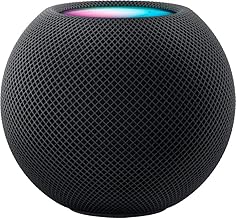
Apple HomePod Mini smart speaker in black

The HomePod Mini is a compact Apple smart speaker designed to work with supported Apple services and devices.

View the HomePod Mini

Keep a Regular Phone Available

A voice assistant should not replace every other communication device.

Wi-Fi fails. Power outages happen. Accounts stop connecting. Smart speakers sometimes misunderstand commands.

Keep a reliable telephone available as a backup.

Serene Innovations Big-Button Phone

Amplified big-button landline phone with photo buttons for seniors

This amplified landline phone includes large buttons and photo buttons designed for easier calling.

View the Big-Button Phone

How Families Should Set Up a Voice Assistant

Do not plug the device in, create an account, and leave.

Complete the full setup while the senior is present.

  1. Connect the device to Wi-Fi.
  2. Install the correct phone app.
  3. Create or connect the user account.
  4. Increase speaker volume.
  5. Add important contacts.
  6. Test supported calling features.
  7. Set one reminder together.
  8. Set one timer together.
  9. Connect only the smart-home devices the senior needs.
  10. Review privacy settings.
  11. Write down five useful commands.
  12. Test the device from the senior’s normal chair or bed.
Setup Rule: Let the senior speak every command during practice. Watching someone else use the device does not build confidence.

Visit the Stay Connected Guide for more help with video calling, messaging, and family communication.

Useful Voice Commands for Seniors

Reminders

“Remind me to take my evening medication at 7:00.”

“Remind me to call my son tomorrow morning.”

Timers

“Set a timer for 15 minutes.”

“Set a laundry timer for 45 minutes.”

Communication

“Call my daughter.”

“Start a video call with my family.”

Information

“What is the weather today?”

“What time is it?”

“Spell the word appointment.”

Smart-Home Control

“Turn on the bedroom light.”

“Turn off the living room lamp.”

Entertainment

“Play relaxing music.”

“Play my favorite radio station.”

Privacy and Safety Rules

  • Review microphone and camera controls.
  • Use a strong account password.
  • Turn on two-step verification when supported.
  • Review who can call or connect to the device.
  • Do not store banking passwords in voice notes.
  • Do not use a voice assistant to share security codes.
  • Remove former caregivers from connected accounts.
  • Review saved recordings and privacy settings.
  • Place smart displays away from private areas.
  • Teach the senior how to mute the microphone.
Emergency Warning: A voice assistant is not a complete medical alert system. Keep emergency contacts, a working phone, and appropriate alert equipment available.

Voice Assistant Comparison Worksheet

Senior Information

Senior’s name: ____________________________________

Current phone: iPhone / Android / Basic Phone

Current online account: Amazon / Google / Apple / Other

Hearing concerns: Yes / No

Vision concerns: Yes / No

Lives alone: Yes / No

Main Goals

Video calling: Yes / No

Medication reminders: Yes / No

Music and radio: Yes / No

Smart-light control: Yes / No

Weather and information: Yes / No

Family photo display: Yes / No

Product Comparison

Product name: _____________________________________

Purchase price: ___________________________________

Screen included: Yes / No

Smartphone app required: Yes / No

Wi-Fi required: Yes / No

Video calling supported: Yes / No

Works with current phone system: Yes / No

Senior understands basic commands: Yes / No

Family Support

Person responsible for setup: ______________________

Person responsible for updates: ____________________

Backup telephone available: Yes / No

Privacy settings reviewed: Yes / No

Return deadline: __________________________________

Final decision: Buy / Compare More / Do Not Buy

Frequently Asked Questions

What is the easiest voice assistant for a senior?

The easiest choice is usually the one that matches the senior’s existing phone, accounts, and family support system.

Is a smart display better than a smart speaker?

A display is better for video calls, photos, clocks, and visual reminders. A speaker-only device is smaller and simpler.

Do voice assistants work without Wi-Fi?

Most smart speakers and smart displays require an internet connection for their main features.

Can a voice assistant remind a senior to take medication?

It can provide scheduled reminders. A reminder does not confirm whether the medication was taken.

Can a senior use a voice assistant for emergencies?

Some supported systems offer calling or emergency-related features. Families should not depend on a voice assistant as the only emergency method.

Are voice assistants private?

They include microphones and connected accounts. Families should review privacy controls, account access, saved recordings, camera settings, and microphone controls.

Where should a voice assistant be placed?

Place it where the senior spends time and where the device can hear commands clearly. Avoid bathrooms and other private areas.

Final Thoughts

Voice assistants help seniors living alone stay connected, manage routines, control compatible devices, and access everyday information.

The best device depends on the senior’s existing phone, internet service, hearing needs, family support, and comfort with technology.

A smart display offers visual help and video calling. A smart speaker offers a simpler voice-only experience.

Families should complete the setup, test the commands, review privacy controls, and leave written instructions.

Keep a working phone and emergency plan available.

A voice assistant should make life easier. It should never become another device sitting unplugged because nobody explained how to use it.

Help Seniors Stay Connected and Independent

Visit the Stay Connected Guide for help with video calls, smartphones, tablets, messaging, family photos, and easier communication.

Open the Stay Connected Guide

Tuesday, September 15, 2026

The Complete Caregiver Technology Checklist for Aging Parents

The Complete Caregiver Technology Checklist for Aging Parents

Affiliate Disclosure: This post contains affiliate links. As an Amazon Associate, I earn from qualifying purchases. If you purchase through a link on this page, I may earn a commission at no additional cost to you.

Caregiver technology should make life safer and easier for an older adult.

It should also help families respond faster, communicate clearly, manage medication, monitor important changes, and support independence.

The problem is that families often buy several devices without creating a complete system.

A medical alert arrives, but nobody knows who should respond. A bed sensor sends constant false alarms. A smart lock works until the batteries die. A medication dispenser is purchased, but nobody checks whether it is filled correctly.

Technology alone does not create a caregiving plan.

This complete checklist helps caregivers, adult children, grandchildren, spouses, neighbors, and family members decide what technology an aging parent needs, who will manage it, and how the entire system should work together.

Quick Caregiver Checklist

  • Identify the senior’s most important safety concerns.
  • Confirm emergency contacts and response roles.
  • Make the phone easier to see, hear, and use.
  • Review medical alerts and caregiver call buttons.
  • Check medication reminders and pill organization.
  • Test bed, motion, door, and wandering sensors.
  • Review smart locks, cameras, lighting, and doorbells.
  • Check home-health monitoring devices.
  • Protect passwords, accounts, and private information.
  • Test every device before the family depends on it.

Start With the Senior’s Real Needs

Do not begin by buying devices.

Begin by identifying the problems that create the greatest risk, frustration, or loss of independence.

Ask these questions

  • Does the senior live alone?
  • Has the senior fallen recently?
  • Does the senior get out of bed safely?
  • Are medications missed or repeated?
  • Can the senior hear the phone?
  • Can the senior read messages and menus?
  • Does the senior remember emergency procedures?
  • Are scam calls or suspicious messages a problem?
  • Does the senior wander or become confused?
  • Do family members live nearby or far away?
  • Does the senior use a cane, walker, wheelchair, or lift chair?
  • Which tasks does the senior want to keep doing independently?
Caregiver Rule: Solve the most serious problem first. Buying ten devices at once creates ten new manuals, ten new passwords, and ten new ways for the family to become confused.

Read: How to Keep Aging Parents Safe in the Digital Age .

1. Communication Technology

Every caregiver plan should begin with reliable communication.

The senior should have at least one device that makes calling family, caregivers, neighbors, and emergency help easy.

Check the senior’s phone

  • Increase text size.
  • Increase ringtone and call volume.
  • Add important contacts to Favorites.
  • Remove unnecessary apps from the first screen.
  • Turn on spam-call protection.
  • Add emergency medical information.
  • Test calling and texting.
  • Test video calling.
  • Confirm the phone charges correctly.

Follow: 10 Minutes to a Senior-Friendly Smartphone .

You should also read: The Grandma-Proof Home Screen .

Amazon Echo Show 5

Amazon Echo Show 5 smart display for video calls reminders and voice commands

The Echo Show 5 supports video calls, voice commands, reminders, music, information, and compatible smart-home controls.

View the Echo Show 5

Visit the Stay Connected Guide for more family communication ideas.

2. Emergency Alerts and Response

A medical alert system should do more than make noise.

The family needs to know who receives the alert, who responds first, and when emergency services should be contacted.

Check these features

  • Emergency call button
  • Automatic fall detection
  • Two-way voice
  • GPS tracking
  • Water resistance
  • Battery life
  • Cellular or Wi-Fi requirements
  • Professional monitoring fees
  • Caregiver app access
  • Cancellation terms

Family Caregiver Medical Alert System

Medical alert system with caregiver app panic button necklace and bracelet

This home system includes a caregiver app, panic buttons, a Wi-Fi receiver, necklace, and bracelet. It sends alerts to family or caregivers without professional monitoring.

View the Family Alert System

Read: The Safety and Independence Guide .

3. Medication Management

Medication mistakes often happen because schedules become complicated.

A caregiver should know:

  • Every medication name
  • Each dosage
  • Scheduled times
  • Known allergies
  • Prescribing providers
  • Pharmacy information
  • Refill dates
  • Which person fills the organizer or dispenser

Choose the correct level of help

  • A simple organizer for an independent routine
  • A reminder clock for forgotten times
  • An automatic dispenser for scheduled medication access
  • A locking dispenser for repeated or confused dosing
  • An app-connected device for remote caregiver tracking

Windtrace Automatic Pill Dispenser

Windtrace automatic pill dispenser with alarm lock and large display

This dispenser includes 28 slots, sound and light reminders, a built-in lock, and a large digital display.

View the Automatic Pill Dispenser

Visit the Health and Wellness Tech Guide .

4. Bed, Motion, and Wandering Alerts

Movement alerts help caregivers respond when a senior gets out of bed, enters a hallway, approaches a doorway, or moves into an unsafe area.

They are useful for seniors with:

  • Fall risk
  • Balance problems
  • Dementia
  • Nighttime confusion
  • Unsafe wandering
  • Recent surgery
  • Limited mobility

Smart Caregiver Bed Alarm

Smart Caregiver bed alarm for elderly adults and fall prevention

This system uses a weight-sensing bed pad to alert a caregiver when the senior gets up.

View the Bed Alarm

Smart Caregiver Motion Sensor and Pager

Smart Caregiver wireless motion sensor alarm with pager

This wireless motion sensor sends alerts to a caregiver pager and supports a range of up to 300 feet.

View the Motion Sensor

Wi-Fi Smart Bed Sensor

Wi-Fi smart bed sensor alarm for seniors and caregivers

This system sends app-based bed-exit alerts and requires 2.4 GHz Wi-Fi.

View the Wi-Fi Bed Sensor
Alert Rule: Do not place sensors randomly. Poor placement creates false alarms. Constant false alarms teach caregivers to ignore the device.

5. Health Monitoring Technology

Caregivers often help track blood pressure, oxygen levels, weight, glucose, heart rate, and medication schedules.

A device only helps when the readings are taken correctly and recorded consistently.

Caregiver health-monitoring checklist

  • Confirm the device is the correct size.
  • Read the instructions.
  • Check batteries or charging.
  • Use the device at a consistent time.
  • Record the date, time, and result.
  • Watch for unusual changes.
  • Bring records to appointments when appropriate.
  • Do not change medication based only on a home reading.

One-Touch Blood Pressure Monitor

One-touch upper arm blood pressure monitor with large backlit display

This upper-arm monitor includes one-touch operation, a large display, a wide-range cuff, and reading storage.

View the Blood Pressure Monitor

Read: Senior Health Tech: 5 Tools That Help Protect Older Adults .

6. Smart-Home Safety

Smart-home devices help caregivers manage entry, lighting, visitors, and check-ins.

Useful devices include

  • Video doorbells
  • Smart locks
  • Indoor cameras
  • Smart lighting
  • Voice assistants
  • Motion sensors

Read: The Simple Senior Home Security Plan .

Philips Wi-Fi Smart Deadbolt

Philips Wi-Fi smart deadbolt with keypad fingerprint and app access

This lock supports keypad entry, fingerprint access, app control, automatic locking, and voice-assistant compatibility.

View the Philips Smart Lock
Privacy Rule: Seniors should know where cameras and sensors are located, who has access, and what information is being recorded.

7. Daily Living and Mobility Support

Caregiver technology is not limited to apps and Wi-Fi.

Simple products often prevent bending, reaching, lifting, and unsafe movement.

Review

  • Walkers and rollators
  • Bed rails
  • Lift chairs
  • Grab bars
  • Reacher tools
  • Jar openers
  • Large-button remotes
  • Amplified phones

EZPIK Pro 43-Inch Reacher

EZPIK Pro foldable grabber reacher tool for seniors

This foldable reacher helps reduce bending and stretching while picking up items indoors or outdoors.

View the EZPIK Reacher

8. Online Safety and Scam Protection

Caregivers should regularly review suspicious calls, texts, emails, account alerts, and pop-up messages with aging parents.

Watch for

  • Requests for gift cards
  • Unexpected verification-code requests
  • Fake bank alerts
  • Fake delivery messages
  • Remote computer access requests
  • Grandchild emergency scams
  • Fake government calls
  • Pressure to act immediately
  • Requests to keep the conversation secret

Caregiver safety steps

  • Turn on spam-call protection.
  • Review privacy settings.
  • Use different passwords.
  • Turn on two-step verification.
  • Set one trusted family contact for suspicious messages.
  • Remove unsafe remote-access software.
  • Review banking and shopping alerts.

Read: How Seniors Can Stay Safe When Using AI .

Build a Family Technology System

The family should know who manages each part of the caregiving setup.

Assign clear roles

  • Primary emergency contact
  • Backup emergency contact
  • Nearby helper
  • Medication manager
  • Technology manager
  • Medical appointment contact
  • Home-maintenance contact
  • Financial safety contact

One person might handle several roles. The important point is making the responsibility clear.

Family Rule: Do not assume another relative is handling something. Put names beside every responsibility.

Weekly Caregiver Technology Checklist

☐ Check the senior’s phone battery.

☐ Test calling and texting.

☐ Review missed calls and suspicious messages.

☐ Confirm medication reminders.

☐ Check pill organizer or dispenser.

☐ Test the medical alert button.

☐ Check sensor batteries.

☐ Review camera or doorbell alerts.

☐ Check smart-lock access.

☐ Confirm health-monitoring supplies.

☐ Ask the senior what is frustrating them.

Monthly Caregiver Technology Checklist

☐ Review emergency contacts.

☐ Update the medication list.

☐ Install phone and app updates.

☐ Review subscriptions and monthly charges.

☐ Test backup batteries.

☐ Review Wi-Fi performance.

☐ Check who has app and camera access.

☐ Remove former caregivers from accounts.

☐ Review passwords and recovery information.

☐ Test the family response plan.

☐ Ask whether any device should be changed or removed.

Caregiver Technology Planning Worksheet

Senior Information

Senior’s name: ____________________________________

Primary residence: _________________________________

Main caregiver: ____________________________________

Backup caregiver: __________________________________

Nearby helper: _____________________________________

Main Concerns

Fall risk: Yes / No

Medication concerns: Yes / No

Memory concerns: Yes / No

Wandering concerns: Yes / No

Scam concerns: Yes / No

Communication concerns: Yes / No

Main problem to solve first: ________________________

Current Technology

Phone: _____________________________________________

Medical alert: _____________________________________

Medication device: _________________________________

Bed or motion sensor: _______________________________

Smart lock or doorbell: _____________________________

Health-monitoring devices: __________________________

Family Responsibilities

Emergency alerts managed by: ________________________

Medication managed by: _____________________________

Technology updates managed by: _____________________

Password access managed by: _________________________

Device batteries checked by: ________________________

Next family review date: ____________________________

Senior Approval

Does the senior understand the devices? Yes / No

Does the senior agree with monitoring? Yes / No

Does the senior know who receives alerts? Yes / No

Does the senior have written instructions? Yes / No

Frequently Asked Questions

What technology should a caregiver buy first?

Start with the most urgent problem. A reliable phone often comes first. Medical alerts, medication tools, lighting, and movement sensors follow based on the senior’s needs.

How much technology is too much?

It is too much when the senior feels watched, confused, or unable to control the home. Every device should have a clear purpose.

Should caregivers know the senior’s passwords?

Families should create a secure emergency-access plan. The senior should understand who has access and why.

How often should medical alerts and sensors be tested?

Test them after installation, after battery changes or updates, and regularly according to the manufacturer’s instructions.

Are cameras necessary for caregiving?

No. Many families use medical alerts, motion sensors, bed sensors, door contacts, and scheduled calls instead. Privacy should remain part of the decision.

What if the senior refuses a device?

Ask why. The device might feel confusing, intrusive, uncomfortable, or unnecessary. Look for a less intrusive solution that addresses the same problem.

Final Thoughts

Caregiver technology works best when the family creates a complete system.

A phone, medical alert, pill dispenser, bed sensor, smart lock, camera, or blood pressure monitor should never operate without clear instructions and assigned responsibilities.

Start with the senior’s needs. Respect privacy. Test every device. Review the plan regularly.

Caregivers should use technology to support independence, not replace human contact.

The best system helps the senior feel safer while helping the family respond with less confusion.

Build a Safer Caregiver Technology Plan

Visit the Safety and Independence Guide for help with medical alerts, home safety, scam protection, health monitoring, and emergency planning.

Open the Safety and Independence Guide

Tuesday, September 1, 2026

The Ultimate Senior Technology Buying Guide for 2026

The Ultimate Senior Technology Buying Guide for 2026

Affiliate Disclosure: This post contains affiliate links. As an Amazon Associate, I earn from qualifying purchases. If you purchase through a link on this page, I may earn a commission at no additional cost to you.

Buying technology for a senior requires more thought than choosing the newest device or the product with the longest feature list.

A device might look impressive and still be difficult to use, expensive to maintain, dependent on a monthly subscription, incompatible with the senior’s phone, or useless during an internet outage.

The best senior technology solves a real problem. It should improve safety, communication, health tracking, independence, comfort, or daily convenience.

This guide helps seniors, caregivers, adult children, and grandchildren compare the most useful technology categories for older adults in 2026.

Quick Buying Rules

  • Start with the problem, not the product.
  • Choose large displays, clear buttons, and simple controls.
  • Check monthly fees before buying.
  • Confirm phone, Wi-Fi, and carrier compatibility.
  • Review battery life and backup options.
  • Decide who will install and maintain the device.
  • Respect the senior’s privacy and preferences.
  • Test the product before the return period ends.

What to Check Before Buying Senior Technology

Do not buy a product because someone called it “senior-friendly.”

That phrase often appears in advertising without explaining what makes the product easier to use.

Ask these questions

  • What problem does this product solve?
  • Does the senior want it?
  • Are the buttons and text easy to see?
  • Is the sound loud and clear?
  • Does it require Wi-Fi?
  • Does it require a phone app?
  • Does it require a subscription?
  • Will it work during a power outage?
  • Who will install it?
  • Who will provide help when something goes wrong?
  • What is the return policy?
Buying Rule: More features do not automatically mean a better product. Extra features often create extra confusion.

Start with the Senior Tech Simplified Start Here page before choosing a new device.

1. Smartphones for Seniors

A senior-friendly smartphone should make calling, texting, photos, video calls, emergency contacts, and everyday apps easier.

Look for

  • Large screen
  • Adjustable text size
  • Loud speaker
  • Simple home screen
  • Emergency features
  • Reliable battery life
  • Easy charging
  • Carrier compatibility

Lively Jitterbug Smart5

Lively Jitterbug Smart5 smartphone designed for seniors

The Jitterbug Smart5 offers a simplified smartphone experience for older adults. It requires an activated Lively phone plan and does not work with other carriers.

View the Jitterbug Smart5

Read: 7 Best Smartphones for Seniors in 2026 .

Compare: Apple vs. Android for Seniors .

2. Tablets and Video Calling Devices

Tablets give seniors larger screens for video calls, photos, reading, games, entertainment, email, and web browsing.

Families should decide whether the senior needs a regular tablet or a simplified service designed specifically for older adults.

GrandPad for Seniors

GrandPad easy-to-use tablet and phone for seniors

GrandPad offers video calling, family photo sharing, games, communication tools, and built-in scam protection. It requires a service plan.

View the GrandPad

Amazon Fire HD 10

Amazon Fire HD 10 tablet with large full HD screen

The Fire HD 10 offers a large screen for reading, video, entertainment, email, and supported communication apps.

View the Fire HD 10

Visit the Stay Connected Guide for help with video calls, messages, and family photo sharing.

3. Medical Alert Systems

Medical-alert systems generally fall into two groups.

  • Systems that alert family members or caregivers directly
  • Systems that connect to professional monitoring services

Compare

  • Fall detection
  • GPS tracking
  • Two-way communication
  • Water resistance
  • Cellular coverage
  • Battery life
  • Monthly cost
  • Contract terms
  • Cancellation policy

Family-Alert Medical Pendant

Medical alert pendant with fall detection GPS and family alerts

This pendant includes family alerts, automatic fall detection, GPS tracking, two-way calling, and a waterproof necklace design.

View the Family-Alert Pendant

MGMini Medical Alert Device

MGMini monitored medical alert device for seniors

The MGMini includes an SOS button, emergency location assistance, and 24-hour monitoring. A monthly subscription is required.

View the MGMini

Visit the Safety and Independence Guide for more information.

4. Health Monitoring Devices

Home-health devices help seniors and caregivers track useful information between appointments.

Common options include:

  • Blood pressure monitors
  • Pulse oximeters
  • Smart scales
  • Glucose monitors
  • Thermometers
  • Smartwatches

One-Touch Blood Pressure Monitor

One-touch upper arm blood pressure monitor with large display

This upper-arm monitor offers one-touch operation, a large backlit display, a wide-range cuff, and reading storage.

View the Blood Pressure Monitor

Innovo Bluetooth Pulse Oximeter

Innovo Bluetooth pulse oximeter with mobile app

This device measures oxygen saturation and pulse rate and connects with a mobile app through Bluetooth.

View the Pulse Oximeter

Visit the Health and Wellness Tech Guide .

5. Medication Management

Medication tools range from simple weekly organizers to automatic dispensers with alarms, locks, apps, and tracking.

Choose based on the senior’s needs

  • Simple organizer for an independent routine
  • Reminder clock for missed times
  • Automatic dispenser for scheduled access
  • Locking dispenser for confusion or repeated doses
  • App-connected device for caregiver tracking

Windtrace Automatic Pill Dispenser

Windtrace automatic pill dispenser with alarm lock and large display

This dispenser includes 28 slots, sound and light reminders, a built-in lock, and a large display.

View the Automatic Pill Dispenser

Daviky Weekly Pill Organizer

Daviky weekly pill organizer with three daily compartments

This organizer includes seven removable daily containers with three compartments per day.

View the Weekly Organizer

6. Smart-Home Safety

Smart-home devices help seniors manage doors, visitors, lighting, cameras, and voice controls.

Strong starting points include:

  • Video doorbell
  • Smart lock
  • Smart bulbs
  • Indoor camera
  • Voice assistant

Read: The Simple Senior Home Security Plan .

You should also read: The Guardian in the Kitchen .

7. Caregiver Technology

Caregiver devices help families monitor movement, bed exits, wandering, and emergency calls.

Smart Caregiver Motion Sensor

Smart Caregiver wireless motion sensor alarm with pager

This wireless sensor sends movement alerts to a caregiver pager and supports a range of up to 300 feet.

View the Motion Sensor

Read: How to Keep Aging Parents Safe in the Digital Age .

8. Daily Living and Mobility Aids

Helpful products do not always need Wi-Fi or an app.

Simple tools often support independence more effectively than complicated electronics.

Useful categories

  • Walkers and rollators
  • Lift chairs
  • Bed rails
  • Grab bars
  • Reacher tools
  • Jar openers

EZPIK Pro 43-Inch Reacher

EZPIK Pro foldable grabber reacher tool for seniors

This 43-inch foldable reacher helps reduce bending and stretching while picking up items indoors or outdoors.

View the EZPIK Reacher

9. Communication and Voice Assistants

Staying connected protects emotional well-being and helps families notice changes sooner.

Useful communication devices include:

  • Amplified cordless phones
  • Smart displays
  • Voice assistants
  • Video calling tablets
  • Large-button remotes

Amazon Echo Show 5

Amazon Echo Show 5 smart display for video calls and reminders

The Echo Show 5 supports video calls, voice commands, reminders, music, information, and compatible smart-home controls.

View the Echo Show 5

Senior Technology Product Comparison Worksheet

Product Information

Product name: ______________________________________

Category: __________________________________________

Problem it solves: _________________________________

Purchase price: ___________________________________

Monthly fee: ______________________________________

Setup Requirements

Wi-Fi required: Yes / No

Phone app required: Yes / No

Specific carrier required: Yes / No

Professional installation: Yes / No

Subscription required: Yes / No

Ease of Use

Large display: Yes / No

Loud sound: Yes / No

Simple buttons: Yes / No

Voice control: Yes / No

Senior understands the device: Yes / No

Safety and Support

Person responsible for setup: ______________________

Person responsible for maintenance: ________________

Backup plan during outage: _________________________

Return deadline: ___________________________________

Final decision: Buy / Compare More / Do Not Buy

Frequently Asked Questions

What is the most useful technology for a senior living alone?

The answer depends on the senior’s needs. Common priorities include a reliable phone, medical-alert system, smart lighting, video doorbell, medication reminder, and health-monitoring device.

Should families buy several devices at once?

No. Start with one problem and one device. Test it thoroughly before adding more technology.

Are subscriptions always bad?

No. Some subscriptions provide useful monitoring, cellular service, cloud storage, or support. The family should understand the cost and cancellation terms.

What makes a product senior-friendly?

Large text, clear buttons, loud sound, simple controls, good instructions, reliable support, and a design that solves a real problem.

Should caregivers control every device?

No. Seniors should understand the device, approve the setup, and keep as much control as possible.

What should families check during the return period?

Test setup, controls, sound, alerts, battery life, Wi-Fi connection, app access, and the senior’s comfort with the product.

Final Thoughts

The best senior technology is not always the most advanced product.

It is the product that solves a real problem without creating three new ones.

Check compatibility, subscriptions, battery life, installation, privacy, support, and return policies before spending money.

Involve the senior in every decision.

Start small. Test everything. Keep written instructions.

Technology should support independence, safety, and confidence.

Start With the Right Senior Technology Guide

Visit the Senior Tech Simplified Start Here page for beginner guides covering phones, safety, health technology, smart homes, caregivers, and staying connected.

Visit the Start Here Page

The Ultimate Holiday Gift Guide for Aging Parents in 2026

The Ultimate Holiday Gift Guide for Aging Parents in 2026 "The best holiday gifts are not the ones that collect dust. They are the on...