The Best Voice Assistants for Seniors Living Alone
Affiliate Disclosure:
This post contains affiliate links. As an Amazon Associate, I earn from qualifying purchases. If you purchase through a link on this page, I may earn a commission at no additional cost to you.
A voice assistant lets a senior control certain technology by speaking instead of tapping small buttons or searching through complicated menus.
A senior might ask for the weather, set a reminder, play music, hear the news, start a timer, call a family member, or control compatible lights.
For someone living alone, those features offer more than convenience. They support communication, routine, confidence, and independence.
The wrong device creates frustration. The right device fits the senior’s phone, home, hearing needs, internet connection, and daily habits.
This guide compares voice assistants, smart speakers, and smart displays for seniors living alone. It also explains what families should check before buying and how to set up the device safely.
Quick Answer
- A smart display works well for video calls and visual reminders.
- A smart speaker works well for music, timers, weather, and voice commands.
- Choose a device that fits the senior’s existing phone and services.
- Set up contacts, reminders, volume, and privacy controls before leaving.
- Write down simple commands the senior can practice.
- Keep a regular telephone available as a backup.
- Do not depend on a voice assistant as the only emergency system.
What Is a Voice Assistant?
A voice assistant is software that responds to spoken questions and commands.
It might operate through a smart speaker, smart display, smartphone, tablet, television, or other connected device.
The senior says a wake word, followed by a request.
“Set a timer for 20 minutes.”
“Remind me to call my daughter at 6:00.”
“Turn on the bedroom light.”
The voice assistant then answers the question or performs the supported action.
How Voice Assistants Help Seniors Living Alone
1. Easier communication
Smart displays and compatible speakers help seniors call family members without searching through a contact list.
2. Daily reminders
Seniors can set reminders for medication, appointments, meals, phone calls, trash pickup, and household tasks.
3. Timers and alarms
Voice-controlled timers help with cooking, laundry, exercises, naps, and medication schedules.
4. Smart-home control
Compatible lights, plugs, televisions, thermostats, locks, and cameras might be controlled through voice commands.
5. Entertainment
Seniors can play music, radio stations, podcasts, audiobooks, and supported videos.
6. Everyday information
A voice assistant helps with weather, basic questions, spelling, calculations, calendar information, and general news.
7. Less dependence on small screens
Voice control helps people who struggle with small buttons, menus, keyboards, vision, arthritis, or limited dexterity.
Read:
5 Digital Assistant Tools That Help Seniors Stay Independent
.
What to Check Before Buying a Voice Assistant
Internet connection
Most smart speakers and smart displays require reliable Wi-Fi.
Smartphone requirement
Setup often requires a compatible smartphone app and user account.
Existing services
A senior already using an iPhone, Android phone, Amazon account, or Google account might find one system easier than another.
Speaker volume
Confirm the device sounds clear enough for the senior’s hearing needs.
Screen or no screen
A display helps with video calls, photos, clocks, recipes, and visual reminders. A speaker-only device is smaller and simpler.
Family support
Someone should remain available to help with updates, passwords, Wi-Fi problems, contacts, and new settings.
Buying Rule:
Choose the system that fits the senior’s current technology. Do not force someone into a completely new system because the device looks impressive.
1. Amazon Echo Show 5
The Echo Show 5 combines a voice assistant with a small display.
The screen supports visual information, compatible video calls, reminders, photos, and smart-home controls.
Best for
- Seniors who want video calling
- Families who share photos
- People who prefer visual reminders
- Smart-home users
- Music, news, timers, and weather
Amazon Echo Show 5

The Echo Show 5 is a compact smart display designed for Alexa services. It supports voice commands, compatible video calling, reminders, music, and smart-home controls.
View the Echo Show 5
2. Amazon Echo Dot
The Echo Dot is a speaker-only voice assistant.
It works well for seniors who want simple voice commands without another screen.
Best for
- Music and radio
- Timers and alarms
- Weather and simple questions
- Voice-controlled smart-home devices
- Bedrooms, kitchens, and small rooms
Amazon Echo Dot

The Echo Dot is a compact smart speaker designed for Alexa voice commands, music, timers, information, and compatible smart-home control.
View the Echo Dot
3. Google Nest Mini
The Google Nest Mini is a compact speaker designed around Google’s voice-assistant services.
It fits seniors already using Android phones, Google accounts, Google Calendar, or other Google services.
Best for
- Google users
- Timers and reminders
- Music and information
- Compatible smart-home controls
- Simple voice questions
Google Nest Mini

This Nest Mini listing includes a compact Google voice-assistant speaker with a US power adapter.
View the Google Nest Mini
4. Apple HomePod Mini
The Apple HomePod Mini fits seniors already using an iPhone, iPad, Apple Music, or other Apple services.
Staying inside one technology system often makes setup and daily use easier.
Best for
- iPhone and iPad users
- Apple household services
- Music and spoken commands
- Compatible smart-home controls
- Families already familiar with Apple setup
Apple HomePod Mini
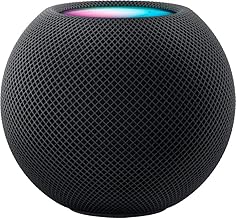
The HomePod Mini is a compact Apple smart speaker designed to work with supported Apple services and devices.
View the HomePod Mini
Keep a Regular Phone Available
A voice assistant should not replace every other communication device.
Wi-Fi fails. Power outages happen. Accounts stop connecting. Smart speakers sometimes misunderstand commands.
Keep a reliable telephone available as a backup.
Serene Innovations Big-Button Phone

This amplified landline phone includes large buttons and photo buttons designed for easier calling.
View the Big-Button Phone
How Families Should Set Up a Voice Assistant
Do not plug the device in, create an account, and leave.
Complete the full setup while the senior is present.
- Connect the device to Wi-Fi.
- Install the correct phone app.
- Create or connect the user account.
- Increase speaker volume.
- Add important contacts.
- Test supported calling features.
- Set one reminder together.
- Set one timer together.
- Connect only the smart-home devices the senior needs.
- Review privacy settings.
- Write down five useful commands.
- Test the device from the senior’s normal chair or bed.
Setup Rule:
Let the senior speak every command during practice. Watching someone else use the device does not build confidence.
Visit the
Stay Connected Guide
for more help with video calling, messaging, and family communication.
Useful Voice Commands for Seniors
Reminders
“Remind me to take my evening medication at 7:00.”
“Remind me to call my son tomorrow morning.”
Timers
“Set a timer for 15 minutes.”
“Set a laundry timer for 45 minutes.”
Communication
“Call my daughter.”
“Start a video call with my family.”
Information
“What is the weather today?”
“What time is it?”
“Spell the word appointment.”
Smart-Home Control
“Turn on the bedroom light.”
“Turn off the living room lamp.”
Entertainment
“Play relaxing music.”
“Play my favorite radio station.”
Privacy and Safety Rules
- Review microphone and camera controls.
- Use a strong account password.
- Turn on two-step verification when supported.
- Review who can call or connect to the device.
- Do not store banking passwords in voice notes.
- Do not use a voice assistant to share security codes.
- Remove former caregivers from connected accounts.
- Review saved recordings and privacy settings.
- Place smart displays away from private areas.
- Teach the senior how to mute the microphone.
Emergency Warning:
A voice assistant is not a complete medical alert system. Keep emergency contacts, a working phone, and appropriate alert equipment available.
Voice Assistant Comparison Worksheet
Senior Information
Senior’s name: ____________________________________
Current phone: iPhone / Android / Basic Phone
Current online account: Amazon / Google / Apple / Other
Hearing concerns: Yes / No
Vision concerns: Yes / No
Lives alone: Yes / No
Main Goals
Video calling: Yes / No
Medication reminders: Yes / No
Music and radio: Yes / No
Smart-light control: Yes / No
Weather and information: Yes / No
Family photo display: Yes / No
Product Comparison
Product name: _____________________________________
Purchase price: ___________________________________
Screen included: Yes / No
Smartphone app required: Yes / No
Wi-Fi required: Yes / No
Video calling supported: Yes / No
Works with current phone system: Yes / No
Senior understands basic commands: Yes / No
Family Support
Person responsible for setup: ______________________
Person responsible for updates: ____________________
Backup telephone available: Yes / No
Privacy settings reviewed: Yes / No
Return deadline: __________________________________
Final decision: Buy / Compare More / Do Not Buy
Frequently Asked Questions
What is the easiest voice assistant for a senior?
The easiest choice is usually the one that matches the senior’s existing phone, accounts, and family support system.
Is a smart display better than a smart speaker?
A display is better for video calls, photos, clocks, and visual reminders. A speaker-only device is smaller and simpler.
Do voice assistants work without Wi-Fi?
Most smart speakers and smart displays require an internet connection for their main features.
Can a voice assistant remind a senior to take medication?
It can provide scheduled reminders. A reminder does not confirm whether the medication was taken.
Can a senior use a voice assistant for emergencies?
Some supported systems offer calling or emergency-related features. Families should not depend on a voice assistant as the only emergency method.
Are voice assistants private?
They include microphones and connected accounts. Families should review privacy controls, account access, saved recordings, camera settings, and microphone controls.
Where should a voice assistant be placed?
Place it where the senior spends time and where the device can hear commands clearly. Avoid bathrooms and other private areas.
Final Thoughts
Voice assistants help seniors living alone stay connected, manage routines, control compatible devices, and access everyday information.
The best device depends on the senior’s existing phone, internet service, hearing needs, family support, and comfort with technology.
A smart display offers visual help and video calling. A smart speaker offers a simpler voice-only experience.
Families should complete the setup, test the commands, review privacy controls, and leave written instructions.
Keep a working phone and emergency plan available.
A voice assistant should make life easier. It should never become another device sitting unplugged because nobody explained how to use it.
Help Seniors Stay Connected and Independent
Visit the Stay Connected Guide for help with video calls, smartphones, tablets, messaging, family photos, and easier communication.
Open the Stay Connected Guide


